Illustrating and interpreting a FAIR assessment
Source:vignettes/illustrating-fairness.Rmd
illustrating-fairness.RmdThis vignette shows how to read the output of an assessment:
the scorecard plot, the score tables, the maturity levels, and the
reuse/access context that rfair adds on top of the F-UJI
metrics. For how the scores are computed see
vignette("methodology"); for a quick tour see
vignette("rfair").
So the vignette renders offline and deterministically, it uses the
bundled example assessment fair_example (a real assessment
of a Zenodo deposit, ). You produce your own the same way:
# (needs network) assess any DOI / PID / URL:
x <- assess_fair("https://doi.org/10.5281/zenodo.8347772")
data(fair_example)
x <- fair_example
x
#> <fair_assessment> https://doi.org/10.5281/zenodo.8347772
#>   resolved: https://zenodo.org/records/8347772
#>   metrics: v0.8 (17 metrics)
#>
#>   FAIR     earned  percent  maturity
#>   F           7/7   100.0%         3
#>   A           7/7   100.0%         3
#>   I           4/6    66.7%         2
#>   R           5/6    83.3%         2
#>   FAIR      23/26    88.5%       2.5
#>
#>   reuse:    open (software, permissive); custom/unknown
The printed summary is the fastest read: an earned/total and percentage per FAIR category, the overall score, and any reuse/access/identifier flags.
1. The scorecard plot
plot() turns the assessment into a one-glance scorecard.
Each bar is a FAIR category filled to its score, labeled with
earned/total and its maturity level (the
colored word on the right). The dark bar at the top is the overall FAIR
score.
plot(x)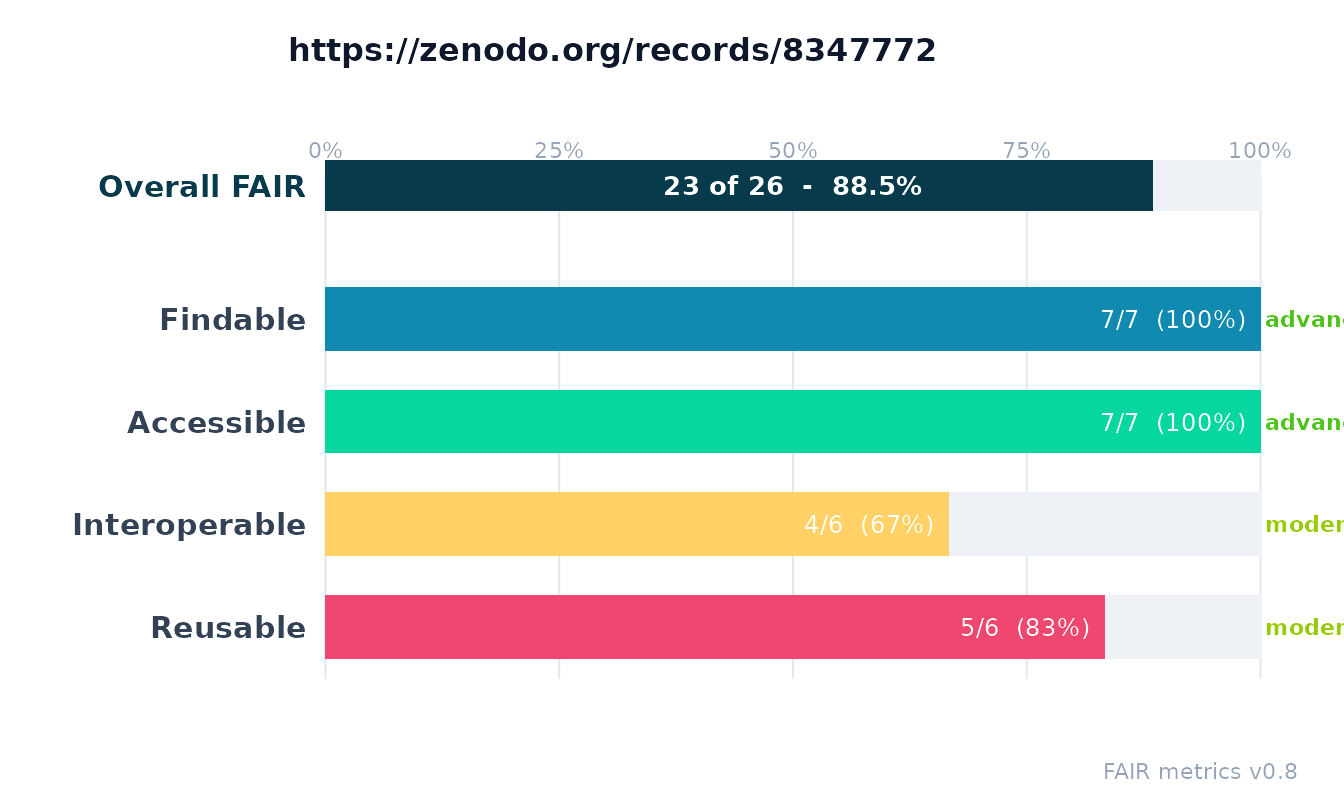
To see which of the 17 metrics drive each category, plot the
per-metric breakdown. Bars are grouped and colored by category (F/A/I/R)
and labeled with the metric identifier and its
earned/total.
plot(x, type = "metric")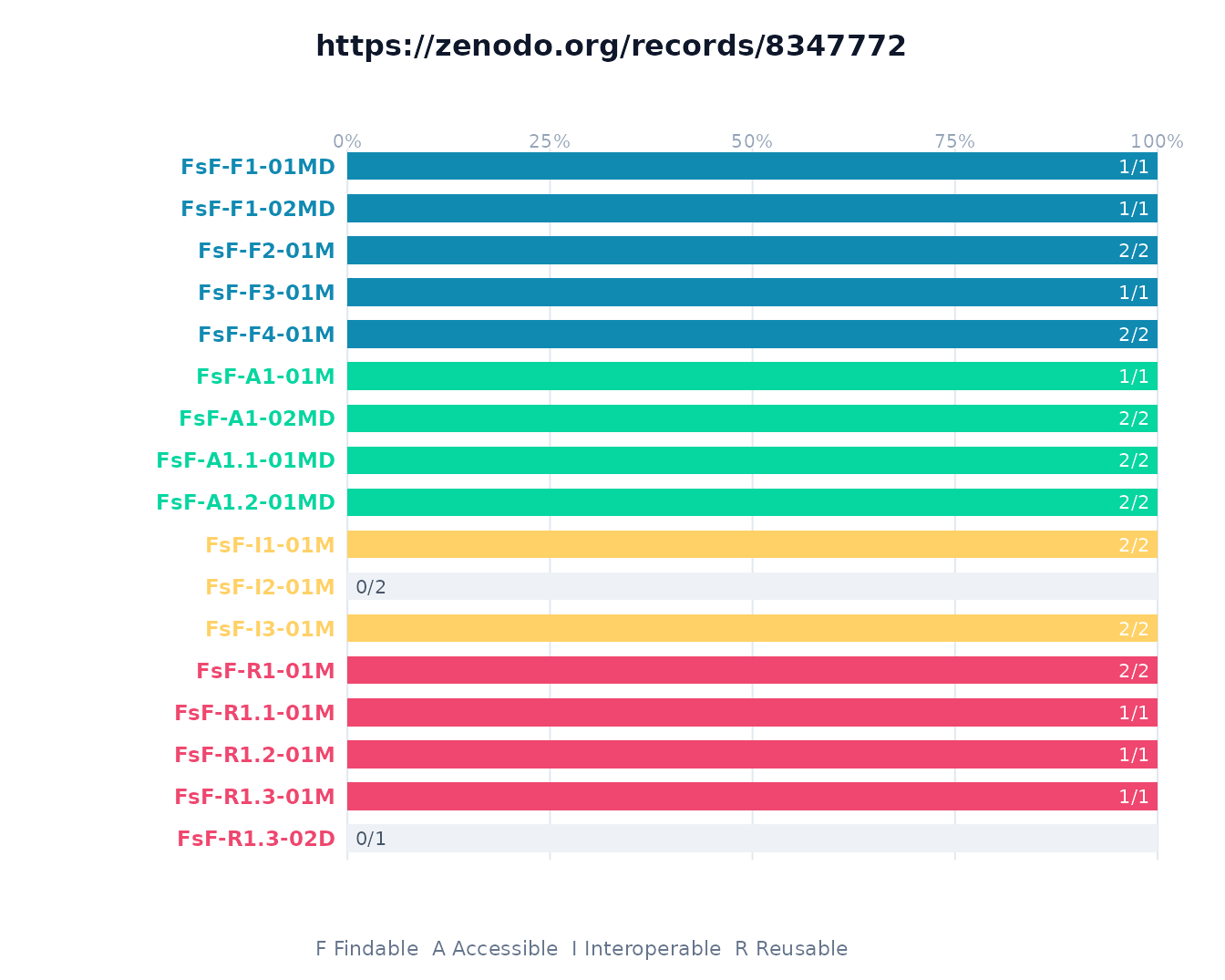
For a compact overview that shows both levels at once,
type = "sunburst" draws a concentric ring chart: the inner
ring is the four FAIR categories and the outer ring is the individual
metrics, each filled in proportion to its score, with the overall FAIR
percentage in the center. This is the same summary the web app
shows.
plot(x, type = "sunburst")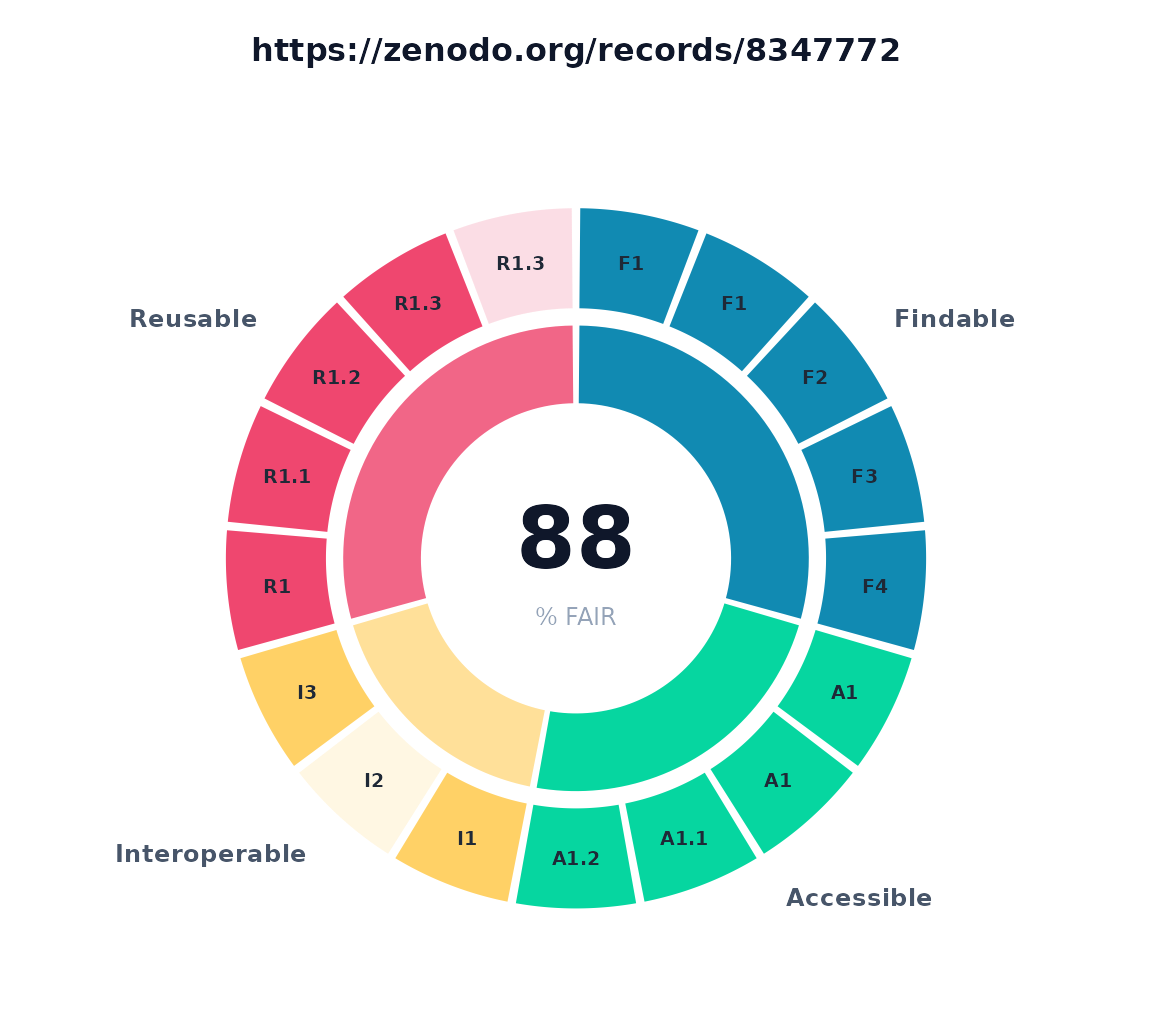
2. Score tables
summary() returns the per-category table behind the
scorecard (handy for reports and further computation):
summary(x)
#>   category earned total percent maturity
#> 1        F      7     7  100.00      3.0
#> 2        A      7     7  100.00      3.0
#> 3        I      4     6   66.67      2.0
#> 4        R      5     6   83.33      2.0
#> 5     FAIR     23    26   88.46      2.5
as.data.frame() gives one row per metric, with its
principle, category, score, maturity, and pass/fail status:
df <- as.data.frame(x)
head(df, 8)
#>   metric_identifier principle category
#> 1       FsF-F1-01MD        F1        F
#> 2       FsF-F1-02MD        F1        F
#> 3        FsF-F2-01M        F2        F
#> 4        FsF-F3-01M        F3        F
#> 5        FsF-F4-01M        F4        F
#> 6        FsF-A1-01M        A1        A
#> 7       FsF-A1-02MD        A1        A
#> 8     FsF-A1.1-01MD      A1.1        A
#>                                                                                                                                                     metric_name
#> 1                                                                                                  Metadata and data are assigned a globally unique identifier.
#> 2                                                                                                       Metadata and data are assigned a persistent identifier.
#> 3 Metadata includes descriptive core elements (creator, title, data identifier, publisher, publication date, summary and keywords) to support data findability.
#> 4                                                                                                    Metadata includes the identifier of the data it describes.
#> 5                                                                     Metadata is offered in such a way that it can be registered or indexed by search engines.
#> 6                                                                                             Metadata contains access level and access conditions of the data.
#> 7                                                                                                         Metadata and data are retrievable by their identifier
#> 8                                                                                    A standardized communication protocol is used to access metadata and data.
#>   earned total percent maturity status
#> 1      1     1     100        3   pass
#> 2      1     1     100        3   pass
#> 3      2     2     100        3   pass
#> 4      1     1     100        3   pass
#> 5      2     2     100        3   pass
#> 6      1     1     100        3   pass
#> 7      2     2     100        3   pass
#> 8      2     2     100        3   pass
Because it is a plain data frame you can slice it however you like, for example the metrics that did not earn full marks:
df[df$earned < df$total, c("metric_identifier", "metric_name", "earned", "total")]
#>    metric_identifier
#> 11        FsF-I2-01M
#> 17      FsF-R1.3-02D
#>                                                                         metric_name
#> 11                                      Metadata uses registered semantic resources
#> 17 Data is available in a file format recommended by the target research community.
#>    earned total
#> 11      0     2
#> 17      0     1
3. How to read the numbers
-
Score (
earned/total). Each metric is worth a fixed number of points; the category score is the sum of earned over total across its metrics, and the overall FAIR score is the sum across all 17 metrics. -
Percent.
earned / total * 100, shown on each bar. -
Maturity (FAIR level). A CMMI level from 0 to 3
(
incomplete,initial,moderate,advanced) summarizing how far up the testing ladder a metric reached. A metric can earn points yet still sit at a low maturity if only its easiest test passed. Maturity is the colored tag on the category scorecard. - A low score is a finding, not a verdict. A restricted-access or unlicensed object can be perfectly legitimate; the score tells you what a machine could and could not verify from the metadata.
4. The context rfair adds beyond the score
A single FAIR percentage hides why an object is or is not
reusable. rfair surfaces that separately (see
vignette("beyond-fuji")); the same information is in the
assessment object and worth showing alongside the scorecard.
License reusability (not merely presence): a license can be detected yet not actually permit reuse.
x$reuse$licenses[[1]][c("license", "category", "rdp_category")]
#> $license
#> [1] "https://opensource.org/licenses/MIT"
#>
#> $category
#> [1] "open (software, permissive)"
#>
#> $rdp_category
#> [1] "permissive"
Access level and sensitivity flags (a restricted object is not a FAIR failure, but you should know):
x$access[c("access", "controlled_access", "sensitive")]
#> $access
#> [1] "public"
#>
#> $controlled_access
#> [1] FALSE
#>
#> $sensitive
#> [1] FALSE
Identifier hygiene (does the persistent identifier resolve cleanly, no obvious problems):
x$identifier_hygiene[c("scheme", "is_persistent", "hygiene_ok")]
#> $scheme
#> [1] "doi"
#>
#> $is_persistent
#> [1] TRUE
#>
#> $hygiene_ok
#> [1] TRUE
5. Exporting the illustration
The assessment serializes for downstream tools.
as_fuji_json() emits a payload matching the upstream F-UJI
FAIRResults schema:
js <- as_fuji_json(x)
substr(js, 1, 220)
#> {
#>   "test_id": "4114fa229002ed3433f77ebd3857888da20b07c6",
#>   "request": {
#>     "object_identifier": "https://doi.org/10.5281/zenodo.8347772",
#>     "metric_version": "0.8",
#>     "use_datacite": true,
#>     "test_debug": false
#>
as_rdf() emits a machine-readable rating (W3C DQV plus a
schema.org Rating as JSON-LD), suitable for embedding in a
landing page:
Summary
-
plot(x)andplot(x, type = "metric")are the quickest way to see an assessment. -
summary(x)andas.data.frame(x)give the numbers as tidy tables. - Read score, percent, and maturity together; treat low scores as questions, not verdicts.
- The reuse, access, and identifier-hygiene elements explain the why behind the number.