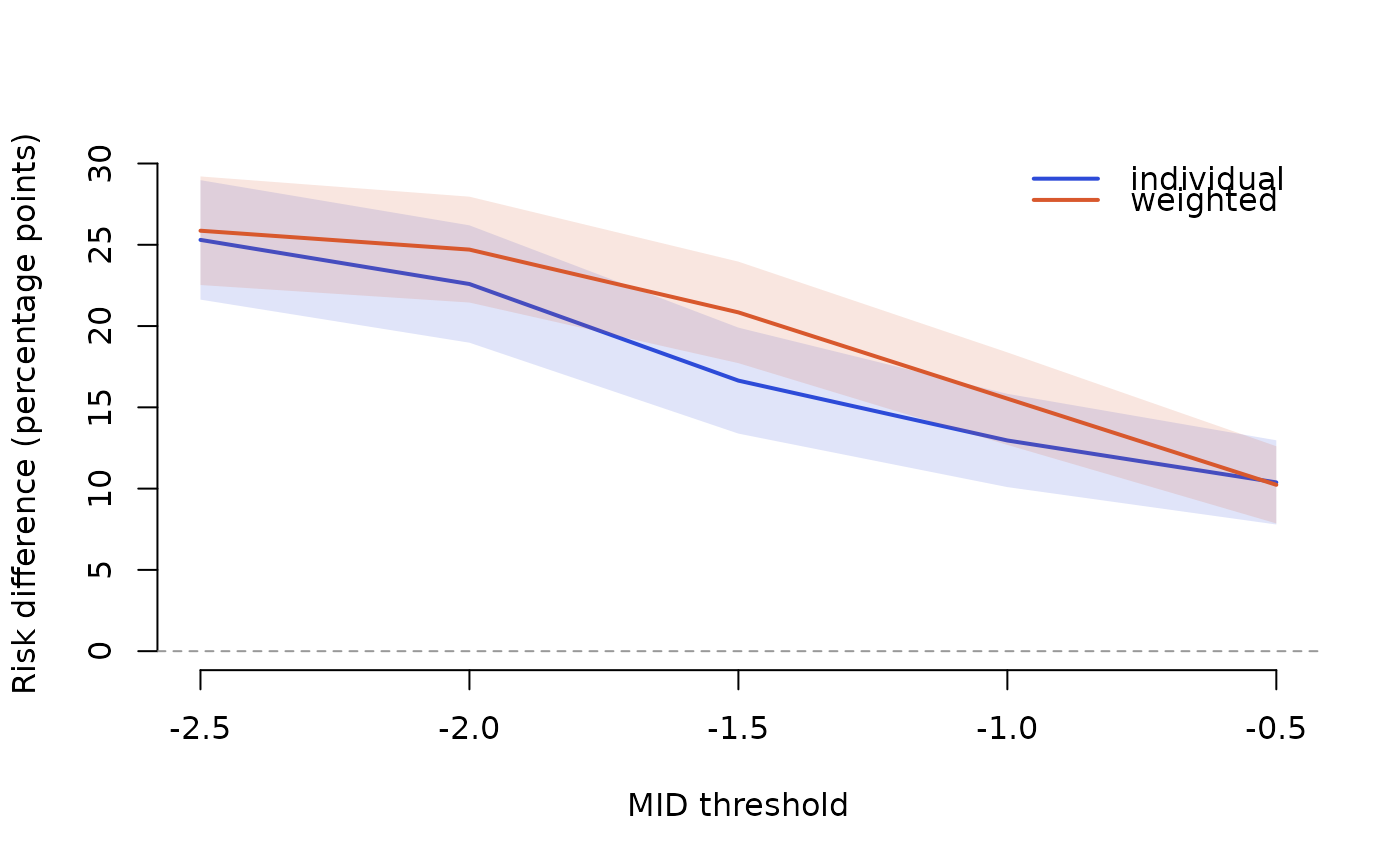
The responder result depends on the chosen minimal important difference
(MID). responder_curve() repeats responder_analysis() over a grid of
thresholds and returns the pooled measures at each, so the dependence on the
threshold can be reported (Thorlund and colleagues, 2011) instead of resting
on one value. For the individual method it also records the largest share
of the risk-difference weight held by one study, which flags thresholds where
a single study (with responder probabilities near 0 or 1) dominates.
Usage
responder_curve(data, mids, method = c("individual", "weighted"), ...)Arguments
- data
A responder-format data frame (see
responder_analysis()).- mids
Numeric vector of MID thresholds to evaluate.
- method
Methods to compute at each threshold (default
"individual"and"weighted").- ...
Further arguments passed to
responder_analysis(), such asdirection,poolingorci_method.
Value
A responder_curve data frame with one row per threshold and
method: mid, method, p_e, p_c, rd, rd_lb, rd_ub, rr,
rr_lb, rr_ub, or, or_lb, or_ub, max_weight and max_weight_study
(individual method), and warning (any warning raised at that threshold).
It has a plot() method.
Details
The bands are pointwise confidence intervals at each threshold, not a simultaneous band over the whole curve.
References
Thorlund K, Walter SD, Johnston BC, Furukawa TA, Guyatt GH (2011). Pooling health-related quality of life outcomes in meta-analysis: a tutorial and review of methods for enhancing interpretability. Research Synthesis Methods, 2(3), 188 to 203. doi:10.1002/jrsm.46
Examples
curve <- responder_curve(vas_pain, mids = seq(-2.5, -0.5, by = 0.5),
  direction = "lower")
#> Split the shared control arm of multi-arm trial(s) Farzaneh 2022, Peng Qiu 2014 across their comparisons (control n divided equally) to avoid double counting. This message is shown once per session.
curve[curve$method == "individual", c("mid", "rd", "rd_lb", "rd_ub", "max_weight")]
#>    mid        rd      rd_lb     rd_ub max_weight
#> 1 -2.5 0.2530099 0.21626590 0.2897540  0.2005029
#> 3 -2.0 0.2258634 0.18976113 0.2619656  0.2005029
#> 5 -1.5 0.1664378 0.13384001 0.1990356  0.2005029
#> 7 -1.0 0.1296191 0.10092543 0.1583127  0.2005029
#> 9 -0.5 0.1038242 0.07791142 0.1297369  0.2005029
plot(curve)